On this page
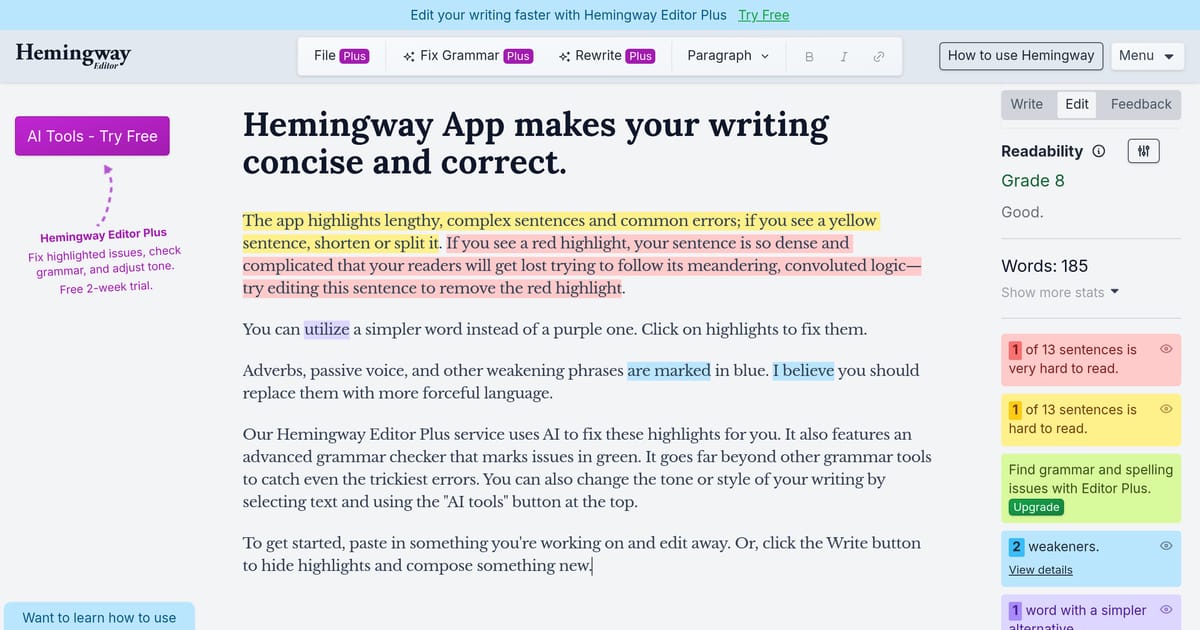
Hemingway Editor is a focused writing tool that grades your text for clarity and readability rather than grammar. Paste in a draft and it colour-codes problems: yellow and red for hard-to-read sentences, blue for adverbs, green for passive voice, and purple for words that have simpler alternatives. A readability score tells you the US school grade level a reader needs to follow along, with lower being better for most web writing.
It is deliberately narrower than Grammarly or ProWritingAid. Those tools chase grammar, spelling, and tone across dozens of checks; Hemingway does one thing — pushing you toward shorter sentences and plainer words. The trade-off is a much simpler, less nagging experience. The tool is named after Ernest Hemingway’s terse style, which is exactly what it nudges you toward.
Key Features
- Colour-coded highlighting for sentence complexity, passive voice, and adverbs
- Flesch-Kincaid readability grade level
- Suggestions for simpler word replacements
- Word count and estimated reading time
- Write and Edit modes to draft distraction-free, then review
- Optional AI rewrite and “fix” tools in the paid plan
Pricing
- Free: Full-featured web editor, unlimited use in the browser
- Desktop App (~$20 one-time): Offline editing, export, and saved documents on Mac and Windows
- Hemingway Plus (~$10/month): AI-powered sentence fixes and rewrites
Best For
Bloggers, content marketers, journalists, and anyone simplifying technical or academic writing for a general audience. It pairs well with a grammar checker rather than replacing one.
Limitations
Hemingway does not correct grammar or spelling, so it is not a Grammarly substitute — you will still need a separate proofreader. Its advice is also rule-based and can wrongly flag long sentences that read perfectly well, so treat the highlights as prompts to review, not orders to obey.